First Try! Study this thread, and take notes. What do you see?
Thread: What to do with client that takes weeks to respond? : freelance
My Notes
OP
- doesn’t understand how to manage client
- has no contract and has rationalized it
- feels like a nuisance after very few emails
Client
- Hasn’t prioritized this project
Commenters
- recognize this is a problem client
- understand OP probably won’t be paid for this work ever
- suggest other forms of communication
Their Notes
- Direct quotes from the post
- Tried to capture how the poster was feeling
- Make note of observations from the discussion versus editorializing or recommending solutions
How to Painstorm any discussion thread on the internet
- Ask yourself, “Why is this thread online?” and “Why does it have so many replies?”
- Find the pain
Amy’s Thread: Is this a really bad idea for painting kitchen cabinets?
- Quick analysis: Person wants to do this thing. Doesn’t think it will work but would like to hear that it will.
Amy’s Notes
OP
- Make note of questions (like the one that is the thread title)
- Make inferences
- Example: “without all the sanding” implies SANDING! (not fun)
- “chalk paint??”- two question marks imply this is a ludicrous idea, but let’s try asking anyway
- person is moving- Amy notes moving is already hard enough
Replies
- one reply shares a six page tutorial
- Amy notes “This Old House” which is mentioned in that same reply because it may be useful later
- Amy notes one commenter’s description of all the work required for chalk paint and that the person says they would “never ever” use it for cabinets
- Amy notes problems commenters mention that would come from using the chalk paint, emphasizing the word “chipping” because that is about more pain
- In a reply, the OP describes their current cabinets as “dark brown.” Amy notes they might describe them as “mahogany” or something similar if they liked them, but they describe as “dark brown” because they don’t.
- “Are there no products that achieve the same results with less work”
- Amy notes “What am I missing?” as a cry of pain
- Sounds to me like desperation as well
- Notes they will leave them dark brown instead of doing a bad job
- Amy notes a brand name suggested. One commenter’s mother painted her cabinets with Tremclad paint.
- Amy notes that one person replies multiple times in this thread. Why would someone reply multiple times in a thread about someone else’s kitchen cabinets?
- They have no life
- They are invested
- Why would they be?
- Don’t add your own stuff to your safari notes unless there are things you know about the subject
- One person suggests checking out the paint forum and says, “Painters are like fisherman; they all have the best bait.” Amy interprets this to mean they all think their way is best and/or they all think they have a secret
- Amy notes one commenter says “kitchen cabinets are the hardest thing to paint in a house and have it look good”
- This person also mentioned stripping which is mentioned and noted because it sounds painful. Commenter says it’s “the killer”
- Amy notes “if there are any shortcuts, I haven’t found them yet”
Orbit
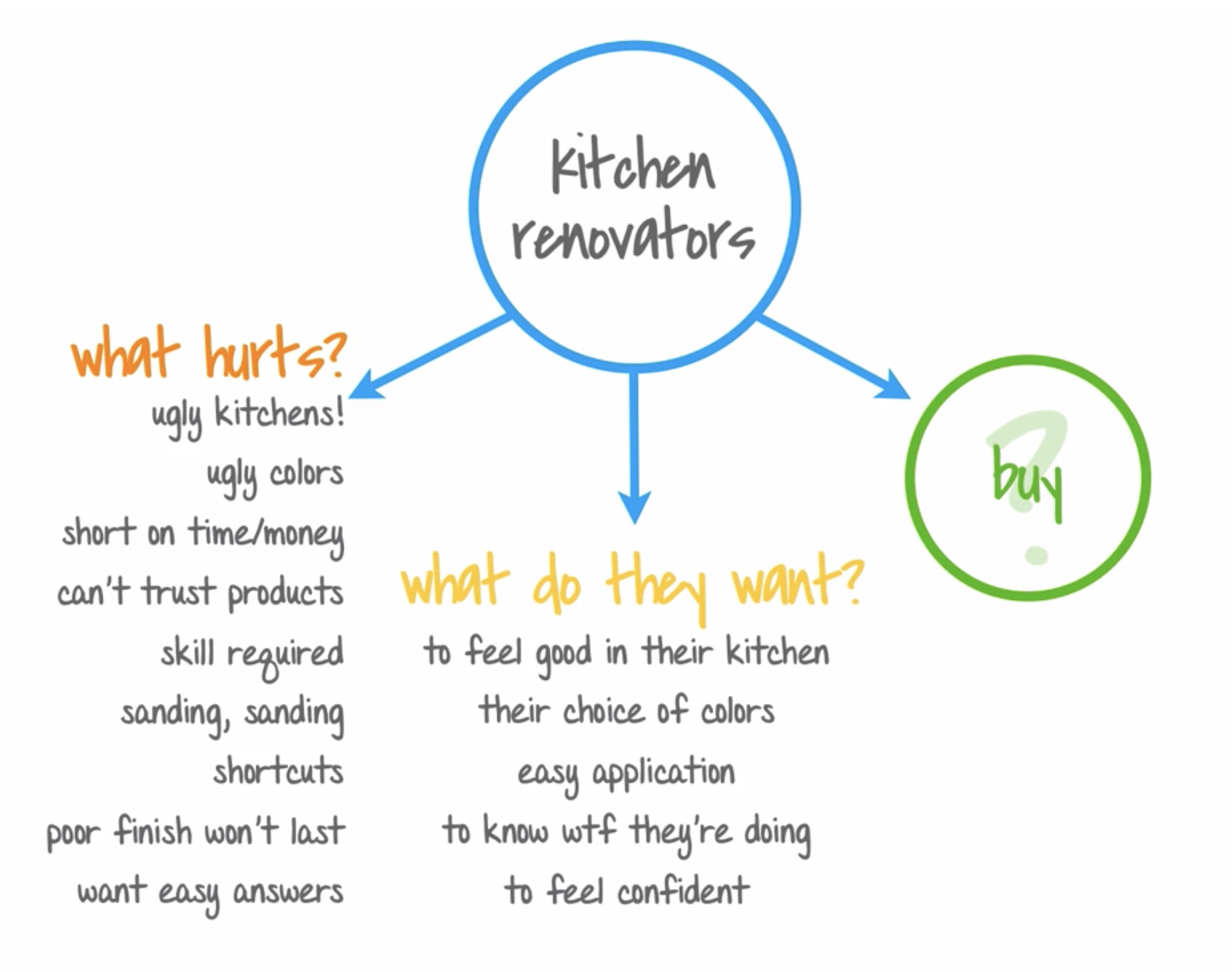
Pain is made of
In terms of this thread…
Facts: outcome/situation
- “I want good looking cabinets without replacing”
Feelings
- anxiety around the work required
- uncertain if the products in question will work
Actions/Behaviors
- asking for help
- procrastinating
- hoping
- looking for alternatives
- trying it
- looking for/taking shortcuts
This is hard
the first 50 times
Practice Painstorming Techniques
OP
- new freelancer
- “constantly fretting about the time I spend doing… basically anything that doesn’t actually pay my bills”
- “I know that all of these things are necessary”
- conflict
- “how many hours a day do you spend on the paid work for your clients?”
- OP is worried they aren’t spending enough time on billable work
Replies
- “worked 9am-12am with a 1.5 hour break for dinner”
- “clocked 6 hours of billable”
- does not bill for emails, phone calls, IM and proposals
- that’s 9 hours not billable work
- Reply to this reply says commenter should be billing for “meetings” which can encompass most of the tasks they’re not billing for
- “if I’m adding value to your business, then you’re going to get charged for it”
- “I bill them for face-to-face meetings, why shouldn’t I bill them for phone or email meetings?”
- “I call it client discovery. Finding out what the client ACTUALLY wants takes time, on their dime”
- “‘Bout four or five (hours) a day lately by choice’”
- “I’m just not all that motivated to sit in a chair all day”
- “It’s tough to find that balance, but I am to even if I make less money.”
- “As a freelance audio video tech/filmmaker, I work 10 hour days on corporate jobs and 12 hours days on film sets”
- “I think exercise is almost as important as work, it refreshes me and gets me away from the screen”
- “…I feel like I can’t stand to look at the screen for another minute because I’ve been in one spot for six hours and I just have to move my body”
- translator- “short notice with a short deadline”
- “preferably, I like to work 5-6 hours a day, 6-7 days a week.”
- “I prefer having free time everyday where I can get other things done than having work and off days”
- “I’m careful not to angst myself into overworking because doing so impacts the quality of the work”
Virtual Hot Seat: Evaluate your Painstorming Notes
30x500 Painstorming Virtual Hot Seat Workbook and Cheat Sheet.pdf
Note: last page of this PDF is a painstorming cheat sheet
My Observations
3 big differences between Craig’s and Jonah’s notes
- Jonah had more interpretation
- Craig was more terse, may even including too little context
- Craig was more organized
Teacher Discussion
- Jonah had more “crispy” details while Craig paraphrased
- Craig pulled solutions from the thread. Jonah inserted his own ideas.
- Jonah recorded
Whose notes are more actionable and why?
- Jonah has enough context to be understood without referring back to the thread
Teacher Discussion
- Both together
- Guidelines:
- Use specific language from the audience – descriptions and jargon
- Hard data and examples give you credibility
- Exact quotes are more persuasive than “clever”
- Channel the emotions so you can describe how it feels
What’s the difference between organizing and synthesizing? Which should you do while on Safari and why?
- Organizing taking what’s there and sorting
- Synthesizing focuses on understanding
Safari is more about synthesizing because you need to understand what of the thread represents painWrong!
Teacher Discussion
- Stick to organizing
- Real data is better than speculation
- Real quotes
- Exact words
- complaints
- suggestions
- thoughts
- opinions
- jargon
- Synthesis will happen automatically with enough data
- Trying to synthesize too early may obscure the actual data
My Notes on Amy and Alex’s Notes
- They separate “recommendations” and put them at the end
- just posted recommendations, not their own
- They skip a line to group related ideas
Analysis of My Notes
- What was missing from my notes vs. other examples
- Didn’t capture the concern about bringing on additional contractors
- Didn’t capture the OP’s concern about working less than commenters
- Didn’t capture the need for reassurance (emotion)
- Didn’t capture the specific things the OP was concerned about spending time on
- These specifics could be valuable to see trends
- Didn’t capture the things the first commenter spends time on
- I captured some minutiae that maybe isn’t too important like several people’s specific numbers of hours
- Didn’t capture as many of the suggested solutions
- Not as good at recognizing pain as Amy and Alex (duh)
- Didn’t split out the recommendations
- Could I write a blog post from just my notes?
- I don’t think so
- Did I organize or synthesize?
- Organized
30x500 Canvas
How to Find Your Audience’s Watering Holes
- Online is better than in-person because there are fewer inhibitions to expressing paing and it’s easier to observe without changing behavior
- Try pulling out on your audience (e.g., instead of “web developers,” you might need to search for simply “developers”) if you can’t find your audience
Watering Hole Keyword Cheat Sheet
- forum
- mailing list
- community
- group
- list
- share
- sharing
- chat
- IRC
- blog
- best
- resources
- tutorials
- help
- FAQs
- reviews
- questions
- wiki
- meet-up, meetup
- user group
- advice
- awards
- competition
- problems
- association
- customers
- client
- sales
- tools
- system / system
Watering Hole Remix Tool (find watering hole searches)
Audience-Finding Query Generator
Note: 30x500 does NOT recommend clicking the # to auto-search the term, but instead, opening a separate tab or window and typing the term into Google to see other possible searches in Google’s autocomplete.
Action Challenge! Where are your Audience’s Watering Holes?
5 Techniques to Find Them
1 - Start with watering holes you already use
You’re already a part of the audience, so you probably have a good idea of at least 1 or 2 places where your audience hangs out online. Possibly more! Write down the links to many as you can think of.
2 - Look for sidebars, members’ post footers, and other “partner” links
Many watering holes recommend other related watering holes for more information. Make sure you look around the watering holes you know about to see if they link to other ones you’ve never really paid attention to. As just one example, most Reddit communities have sidebars that look like this the image to the right and have a list of related subreddits.
Write down the new watering holes you find this way, along with any notes about where you found it, which can be handy later.
3 - Don’t forget the trifecta of peers, newbies, and clients
Where do newbies and clients of your professional audience hang out online? Just like you did for your peers, what watering holes are you already aware of that the newbies and clients in your audience favor? If you’re not sure yet, it’s okay!
4 - Try searching google for your audience name + watering hole keywords
Add keywords like “forum, mailing list, community, group, Twitter…” after your audience name in the Google search box. Write down any watering holes you find on the first 2-3 pages.
(Don’t forget about that cheat sheet we gave you - it contains over 30 keywords you can use in this step. Just go back to the previous lesson to review them again!)
5 - Adjust your audience name with the keyword searchers
For example, after you gather any useful watering holes you find searching for “freelancer + keyword”, dig deeper. There are two ways to modify your audience names:
Get more specific - e.g. “freelance graphic designer + keyword”, “ruby on rails developer + keyword”, “family therapist + keyword”, “university engineering professor + keyword”
Use other ways your audience might describe themselves - e.g. “UX designer + keyword”, “usability designer + keyword”, “interface designer + keyword”, “interaction designer + keyword”
Not sure if your audience is online? Don’t give up, try these advanced techniques!
Brainstorm how your audience describes themselves
- brainstorm audience jargon
- think about specific examples of well-known people in your audience
- how they describe themselves
- how others refer to them
- how they describe their work
- the kinds of people who hire them
- write down a list of terms
- different levels of specificity (e.g., programmers, web developers, python developers, django developers)
- search with these new terms
Don’t prematurely bury “dead” watering holes
- get what you can before you leave
- Do they have other platforms? a blog, forum, Slack, etc.
- Do they link to other relevant sites
- Are there names of people who may be active?
- Do they contain any new jargon you can add to your list?
Dig deeper with industry-specific jargon, tools, and techniques
- build a dictionary of industry-specific terms
- search for those to surface new discussions and watering holds
Examples
Tools
- IDE
- editor
- React, Vue, Angular
- standing desk
- split keyboard
- An Event Apart (conference)
- Clean Code (book)
Jargon
- cloud
- build process
- DRY
- abstraction
- architecture
- bootcamp
- technical interview
- on-site interview
- FAANG
The “lateral” search
- Where do they go for advice?
- Who do they hire?
- What do they buy?
- What do they consume?
Reverse-Search Popular Blogs to find Watering Holes
- Find a popular blog catering to your audience
- Find top articles on that blog at Ubersuggest top pages
- Copy the URL from one of those and paste it into Ubersuggest’s backlinks tool
- Download CSV
- Search CSV for “forum”